¶ Design Dimensions
Reading printing tolerances
Notations like 2H2.2V2.3/H1.9V1.95 should be read the following way:
Size (2): Nominal diameter or size of the fastener.
Superscript (2.2): Printed hole diameter for pass-trough holes for Horizontal surfaces and Vertical surfaces.
Subscript (1.9): Printed hole diameter for threaded, unmodelled holes. If the feature is not threaded, only the superscript will appear. For for Horizontal surfaces and Vertical surfaces.
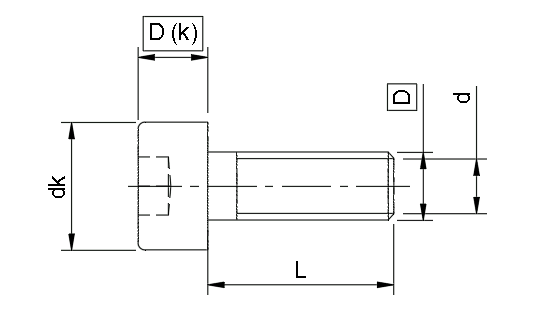
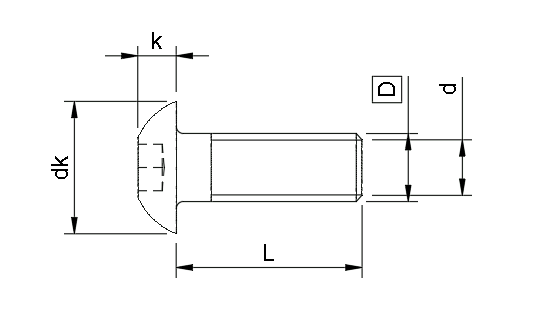
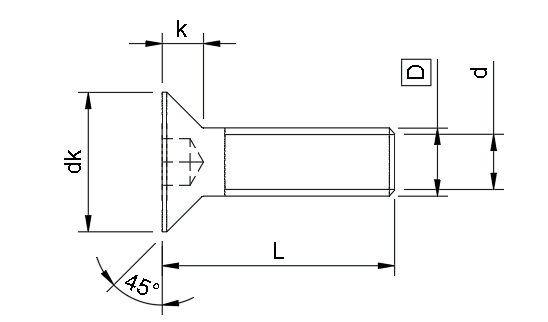
| Size | Socket Head | DIN 912 | ISO 4762 | Button Head | DIN 7380 | ISO 7380 | Flat Head | DIN 7991 | ISO 10642 |
|---|---|---|---|---|---|---|---|---|---|
 |
 |
 |
|||||||
| Diameter (D) | Head diameter (dk) | Head height (k) | Diameter (D) | Head diameter (dk) | Head height (k) | Diameter (D) | Head diameter (dk) | Head height (k) | |
| M2 | 22.2/1.9 | 3.8 | 2 | 2 | 2 | 4 | 1.2 | ||
| M2.5 | 2.5 | 2.5 | 2.5 | ||||||
| M3 | 3 | 5.5 | 3 | 3 | 5.7 | 1.7 | 3 | 6 | 1.7 |
| M4 | 4 | 7 | 4 | 4 | 7.6 | 2.2 | 4 | 8 | 2.3 |
| M5 | 5 | 8.5 | 5 | 5 | 10.5 | 3.3 | 5 | 10 | 2.8 |
| M6 | 6 | 10 | 6 | 6 | 10.5 | 3.3 | 6 | 12 | 3.3 |
| M8 | 8 | 13 | 8 | 8 | 14 | 4.4 | 8 | 16 | 4.4 |
| Comments | Standard-issue hex key screw. | Flatter head | Countersunk head that can be completely hidden inside the part. Length is measured for the whole screw! | ||||||
Reading printing tolerances
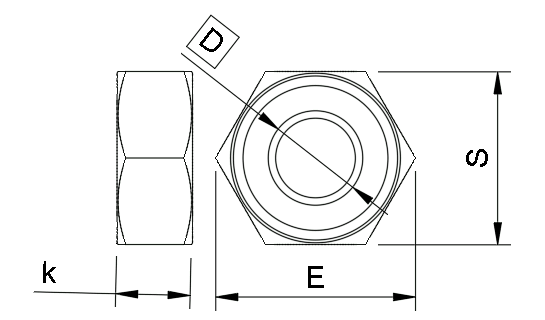
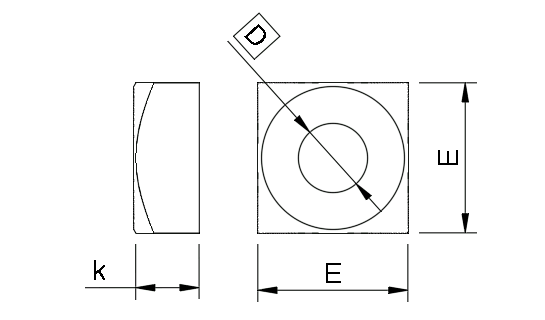
For nuts, superscript is used to denote printed hexagon dimension for fixing the nut in place inside a print. This measure is to be used as a Flat-to-Flat specification (Circumscribed Polygon in Fusion360).
| Size | Hex Nut | DIN 934 | Square Nut | DIN 562 | ISO | ||
|---|---|---|---|---|---|---|---|
 |
 |
||||||
| Thread (D) | Height (k) | Outer Diameter (E) | Flat-to-Flat (S) | Thread (D) | Height (k) | Square length (E) | |
| M2 | 2 | 1.6 | 4.3 | 44.2 | 2 | 1.2 | 4 |
| M2.5 | 2.5 | 2 | 5.5 | 55.2 | 2.5 | 1.6 | 5 |
| M3 | 3 | 2.4 | 6 | 5.55.7 | 3 | 1.8 | 5.5 |
| M4 | 4 | 3.2 | 7.7 | 77.3 | 4 | 2.2 | 7 |
| M5 | 5 | 4.7 | 8.8 | 88.4 | 5 | 2.7 | 8 |
| M6 | 6 | 5.2 | 11.1 | 1010.4 | 6 | 3.2 | 10 |
| M8 | 8 | 6.8 | 14.4 | 1313.4 | 8 | 4 | 13 |
| Comments | Standard hex nuts and nylocs | Square nut | |||||
| Type | M3 Voron Heat inserts | MakerbeamXL Nuts | |||
|---|---|---|---|---|---|
| Outer Diameter | Depth | Length | Width | Height | |
| 54.7 | 45.5 | 15 | 5.4 | 2.3 | |
| The standard M3 heat insert used in Voron projects. Leave at least 2mm from the hole edge to the part edge to prevent heat deformation. |
Tipically used inside MakerbeamXL channels. | ||||
¶ Things to add in the future
- Add diagram for Voron inserts and MakerbeamXL nuts
- Printed dimensions for all of the above.
¶ Choosing a fastener style
For the most part, SHCS should be used for most designs that do not call for speciality fasteners.
For FTC, M4 screws are almost all SHCS, because BHCS(button head) are much easier to strip with their smaller hex key head.
In M3 land, BHCS are sometimes preferred over SHCS because the head diameter is a bit larger and this leads to better pressure distribution on the material. This is only applicable in 3D printed parts, where SHCS can get loose over time due to plastic creep.
FHCS screws can be used to hide the screw in the surface of the part. Take care to design the screw length with the head included.
For M2 and smaller, prefer to always use SHCS. The other screw styles hav very small hex heads and will strip easily.
¶ Material selection
A2 Stainless steel is a very good choice for fastener material. It offers good mechanical properties and will not develop rust even in demanding conditions.
Unfortunately, it is not magnetic. It will not stick to magnetic trays and might not be detected by inductive probes.
Steel has beter mechanical properties than A2, but can rust if exposed to elements and heat.
Screws are often coated with a protective layer: Zinc, Black oxide.
It attracts well magnets and can be used for induction detection.
¶ Bearing Holes
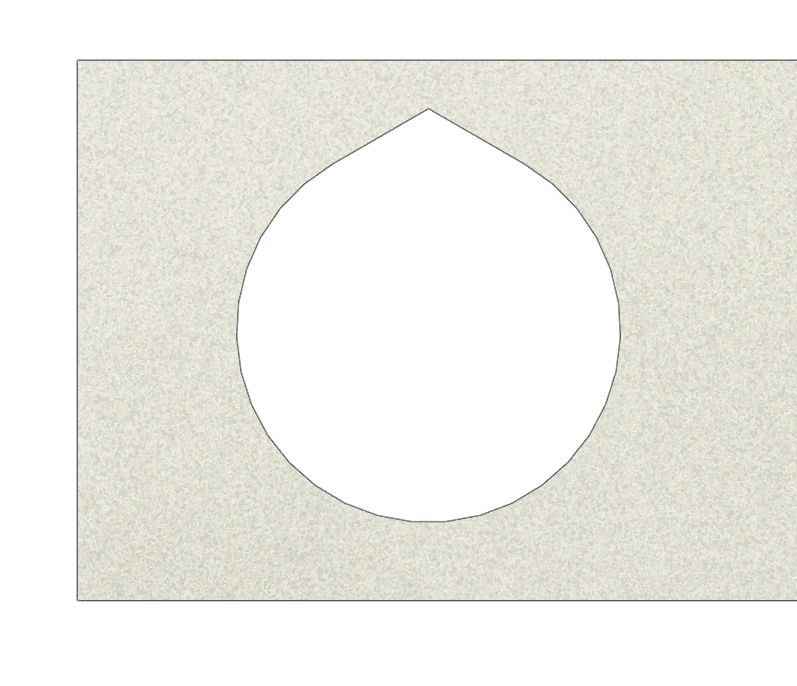
When creating a round hole for a bearing, the slicer's seam placement algorithm will place the seam on the hole surface. Because of this, the hole will appear slightly (0.1mm) tighter. If the assembly is subjected to rough motion, the seam bump will wear out and the bearing will be free to move in the hole.
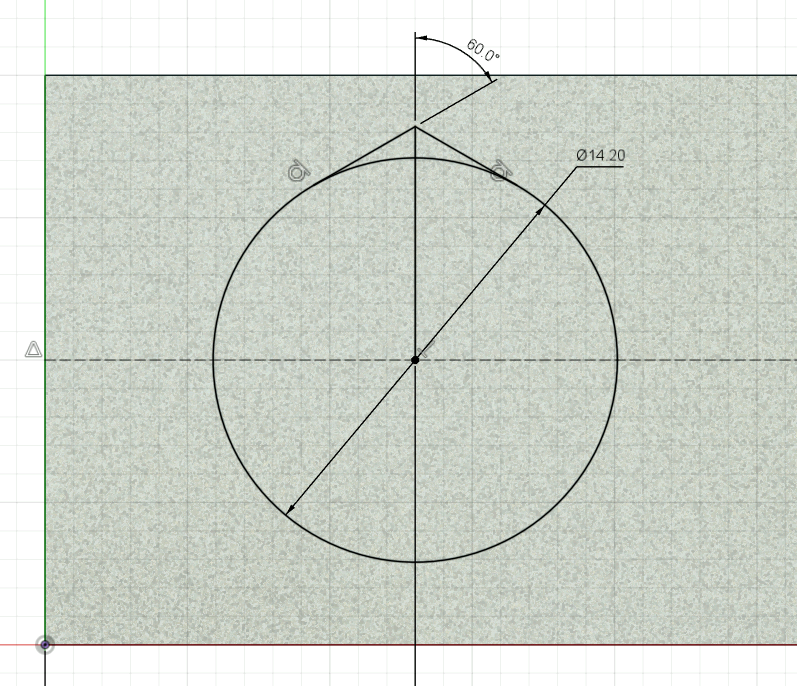
To prevent this situation, we will design bearing holes to have a "teardrop" shape. The opening of the teardrop should have 120* (or the angle of a line with the horizontal is 60*).
 |
 |
|---|
The diameter of the teardrop hole should be approximately 0.2mm over the diameter of the bearing.
For a very tight fit, use D+0.1 instead and assemble using a vice. !
¶ Hexagonal shaft holes
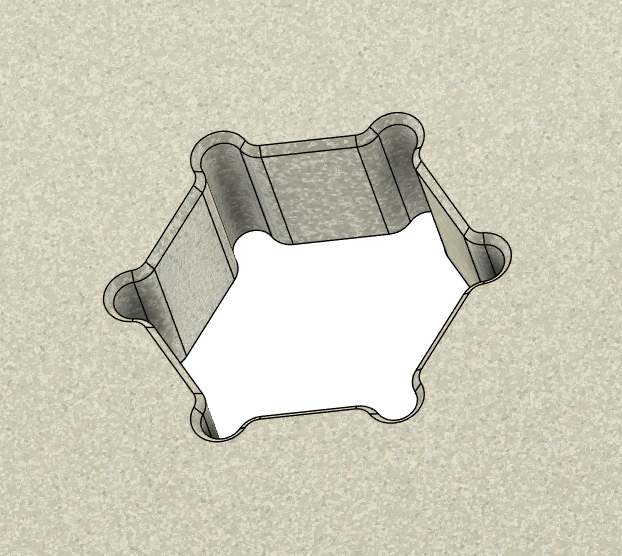
Seams and corner smoothing will create badly-dimensioned holes if modelled as straight hexagons. This phenomenon forces us to design oversized holes. The extra material wears out in time, giving more play in the joint.
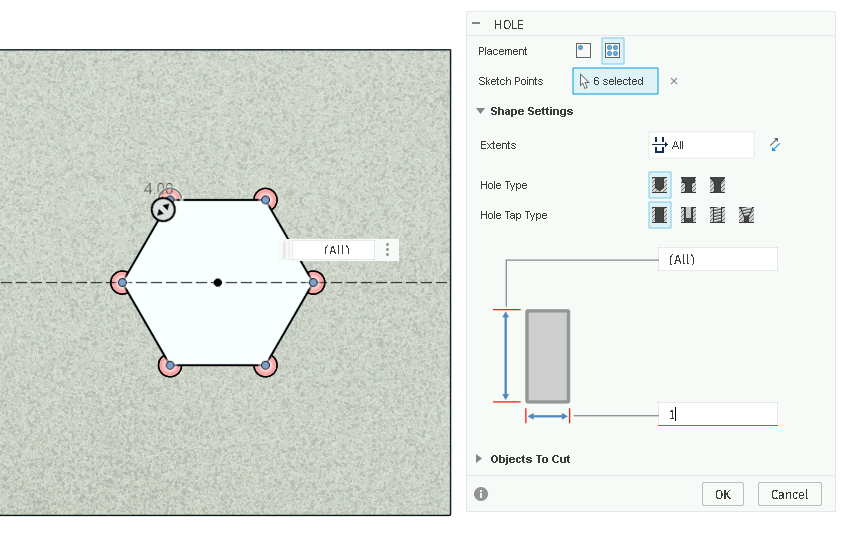
To combat this, we will include small holes (1mm) in the corners of the hexagon. To further prevent corner bulging and first layer imperfections, a small fillet (0.6mm) is added to new edged together with a small chamfer (0.3mm) to the bottom face.
 |
 |
|---|
For a good fit, the hexagon's circumscribed radius should be (D+0.2)/2.
Tighter fits can be made, but assembly will be difficult and will include intensive hammering.
¶ Fusion fastener tool
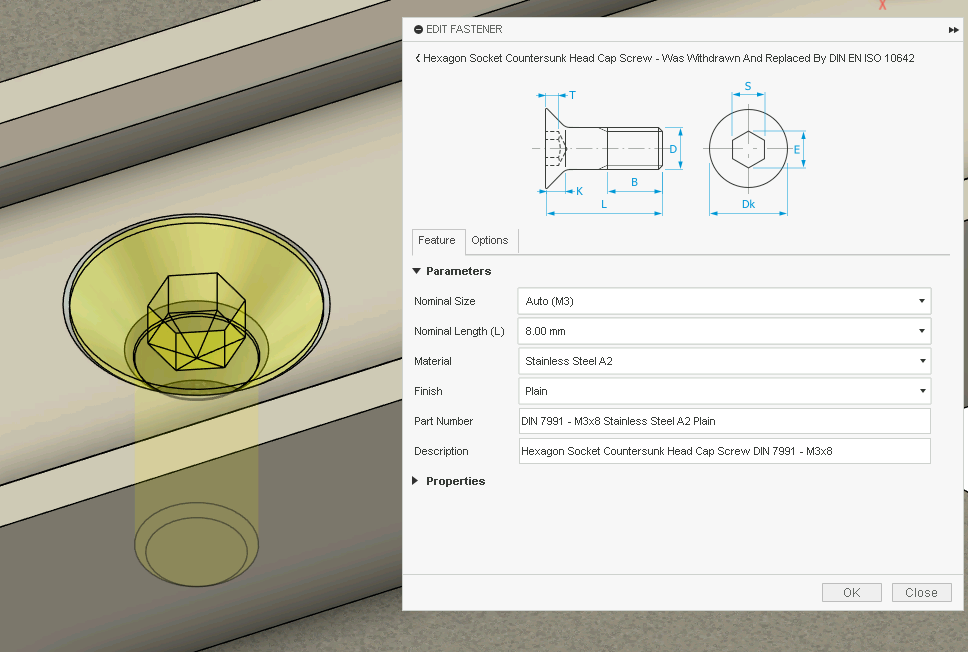
Fusion 360 has an integrated tool to insert fasteners of any kind. Use the Insert fastener tool (from the Solid toolbar, Insert category) and select what kind of fastener you need. We recommend to search by DIN codes.
Then, configure the type of screw or nut (size, length, material) and select the holes to be filled.
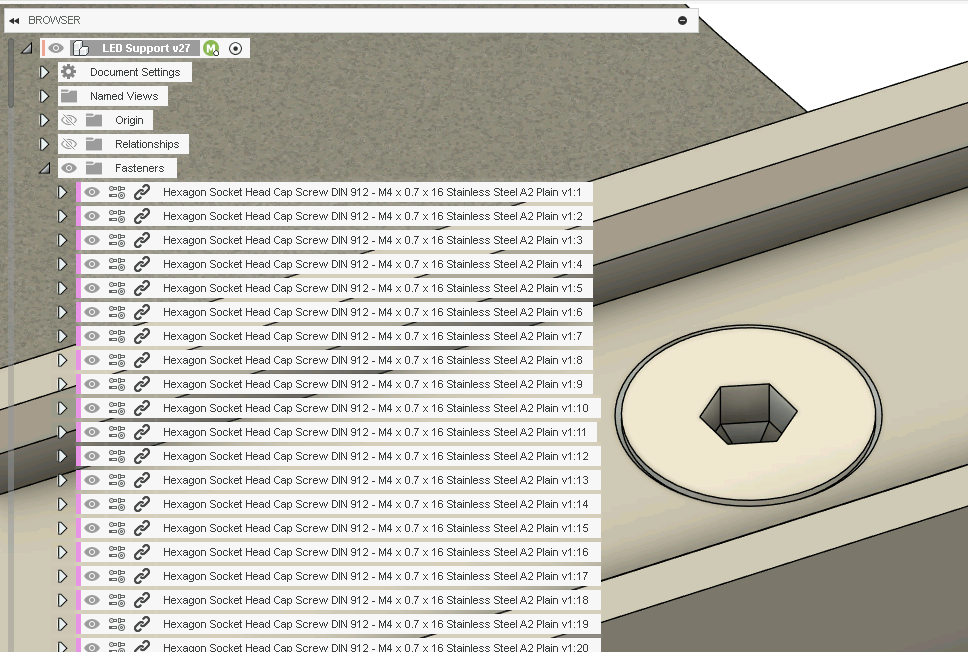
The fasteners are inserted as special components under the top-level Fasteners directory. They will be automatically rigid jointed to the selected features.
 |
 |
|---|
¶ Fusion hole tool
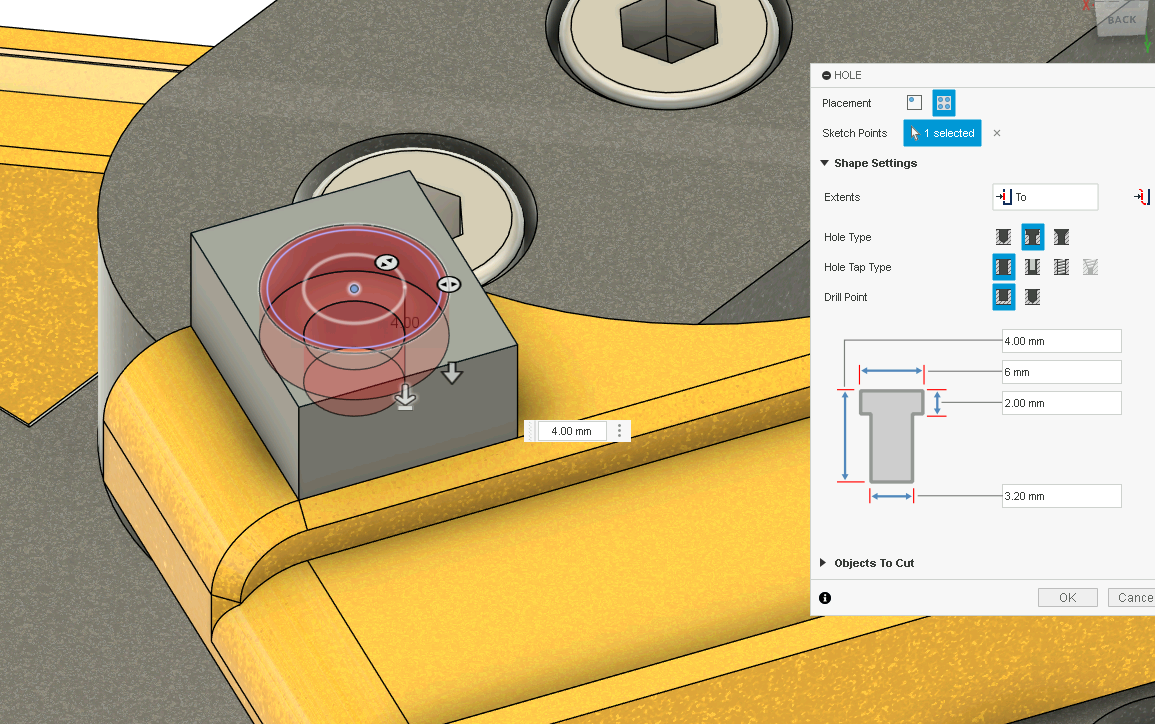
The hole tool is capable of creating more complex holes. It can do countersunks, couterbores, hole tipping and many other options.
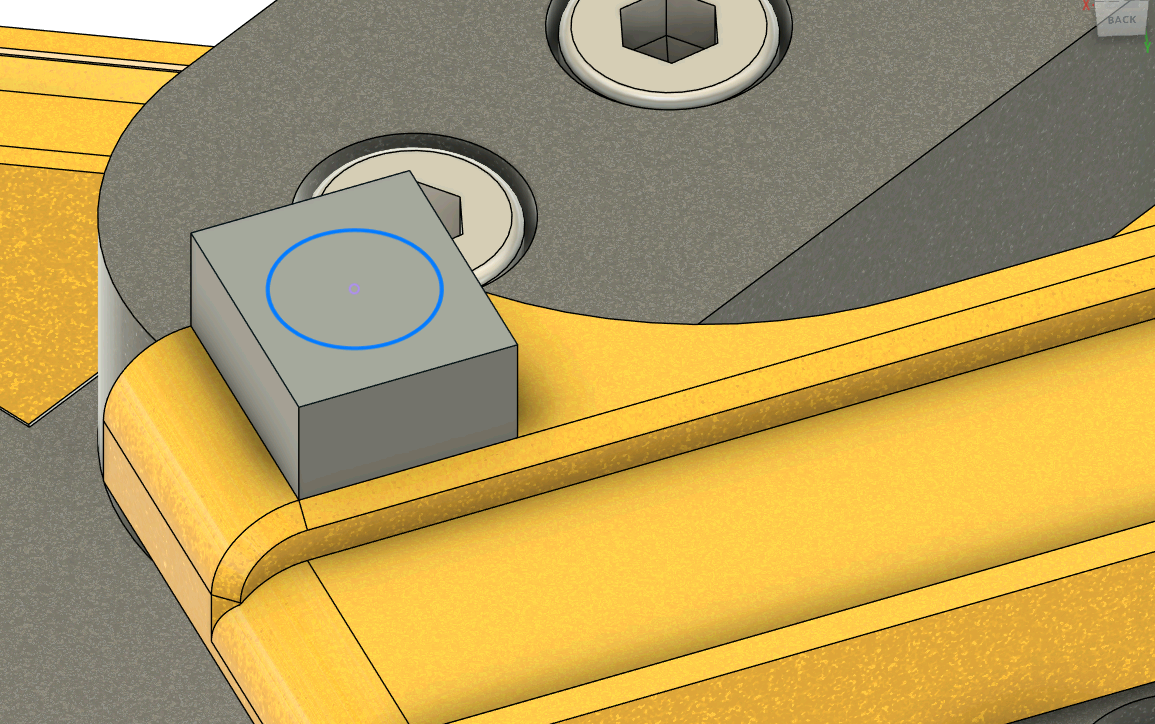
To use, create a sketch with a point (can be a circle, diameter does not matter) where we want to drill the hole. Open the hole tool and select the placement method to On sketch (Multiple holes) and select all your desired hole points. Select your distance (we recommend to use the To Object tool).
There are multiple hole types to choose from. You can do standard, counterbores, countersunken and specify different threads and drill point types.
We do not reccomend using the built-in thread and clearance tap types because we require specific tolerances on our printers. Just create your hole as you would normally.
 |
 |
|---|
¶ Screw Acquisition
Go to tme.eu and login with the team account. Navigate to Elemente Mecanice -> Suruburi cu piulita and select the correct type in filters Norma DIN or Norma ISO. Check Valabile in stoc. KRAFTBERG is the prefferred producer.
A2 stainless steel screws are good. Do not splurge on A4.
¶ Pogo connectors
686C02222030C1E EDAC mates with 685C02212021C1E EDAC
¶ Fastener Availability
| Type | Count | Notes | |||
|---|---|---|---|---|---|
| M2 | To be counted | ||||
| M2.5 | SHCS | A2 | 16mm | 100 | |
| M2.5 | SHCS | A2 | 20mm | 100 | |
| M3 | FHCS | A2 | 4mm | 300 | |
| M3 | FHCS | A2 | 5mm | 200 | |
| M3 | FHCS | A2 | 6mm | 300 | |
| M3 | FHCS | A2 | 8mm | 300 | |
| M3 | FHCS | A2 | 10mm | 300 | |
| M3 | FHCS | A2 | 12mm | 200 | |
| M3 | FHCS | A2 | 16mm | 100 | |
| M3 | FHCS | A2 | 20mm | 100 | |
| M3 | SHCS | A2 | 6mm | To be counted | |
| M3 | SHCS | A2 | 8mm | 500 | |
| M3 | SHCS | A2 | 10mm | 200 | |
| M3 | SHCS | A2 | 12mm | 200 | |
| M3 | SHCS | A2 | 14mm | 100 | |
| M3 | SHCS | A2 | 16mm | 200 | |
| M3 | SHCS | A2 | 20mm | 100 | |
| M3 | SHCS | A2 | 25mm | 100 | |
| M3 | SHCS | A2 | 30mm | 100 | |
| M3 | SHCS | A2 | 35mm | To be counted | |
| M3 | SHCS | A2 | 40mm | To be counted | |
| M3 | SHCS | A2 | 50mm | To be counted | |
| M3 | BHCS | A2 | 8mm | 400 | |
| M3 | BHCS | A2 | 10mm | 200 | |
| M3 | BHCS | A2 | 12mm | 200 | |
| M3 | BHCS | Steel | 16mm | 200 | |
| M3 | BHCS | A2 | 20mm | 200 | |
| M3 | BHCS | Steel | 25mm | 200 | |
| M3 | BHCS | A2 | 30mm | 200 | |
| M3 | BHCS | A2 | 35mm | To be counted | |
| M3 | BHCS | A2 | 40mm | To be counted | |
| M3 | Hex Nut | To be counted, 500 in makerbeam order | |||
| M3 | Lock Nut | To be counted | |||
| M3 | MakerbeamXL Nut | 400 | |||
| M3 | Heat inerts | 200 | |||
| M3 | 2020 Post-install nut | To be counted | |||
| M4 | SHCS | A2 | 6mm | 200 | |
| M4 | SHCS | A2 | 8mm | 400 | |
| M4 | SHCS | A2 | 10mm | 200 | |
| M4 | SHCS | A2 | 12mm | 200 | |
| M4 | SHCS | A2 | 16mm | 400 | |
| M4 | SHCS | A2 | 20mm | 200 | |
| M4 | SHCS | A2 | 25mm | 200 | |
| M4 | SHCS | A2 | 30mm | 100 | |
| M4 | SHCS | A2 | 35mm | 100 | |
| M4 | SHCS | A2 | 40mm | 100 | |
| M4 | Hex Nut | To be counted | |||
| M4 | Lock Nut | To be counted | |||
| M5 | 2020 Post-install nut | To be counted | |||
| M3 | Grub | A2 | 5mm | 10 | |
| M4 | Grub | A2 | 4mm | 800 | Check count, sounds unreasonable |
| M5 | Grub | A2 | 4mm | 100 | |